Forecasting Cash Flow
The Cash Flow page under Plan shows your historical and forecast Cash Flow Statement side by side. Unlike the P&L and Balance Sheet, the Cash Flow is a derived view: every line is calculated from your P&L assumptions, Cash Realization rules, manual journals, and activities. Use it to validate that your forecast leaves you in a healthy cash position and to diagnose anything that looks off.
Why this matters
Profit is an opinion; cash is a fact. Even a profitable forecast can leave you short on cash if revenue is collected too late or if costs hit before income. The Cash Flow page gives you a clear month-by-month view of how cash actually moves through the business, broken down by Operating, Investing, and Financing activity. Because everything here is derived from upstream assumptions, it is also your fastest signal that something earlier in your forecast needs attention.
When to use this
- When forecasting your runway or projecting cash position over the next 12 to 24 months
- When validating that P&L assumptions (Cash Realization timings, growth rates) leave the business cash-positive
- When investigating why a future period shows an unexpected cash dip or surplus
- When preparing a cash-focused view for leadership, lenders, or investors
Before You Start
Make sure you have:
- Your P&L assumptions configured (see Forecasting Profit & Loss)
- Your Cash Realization rules set on revenue and expense lines so cash is timed correctly
- Any one-off cash items (loan drawdowns, asset purchases) recorded as manual journals on the Balance Sheet (see Forecasting Balance Sheet)
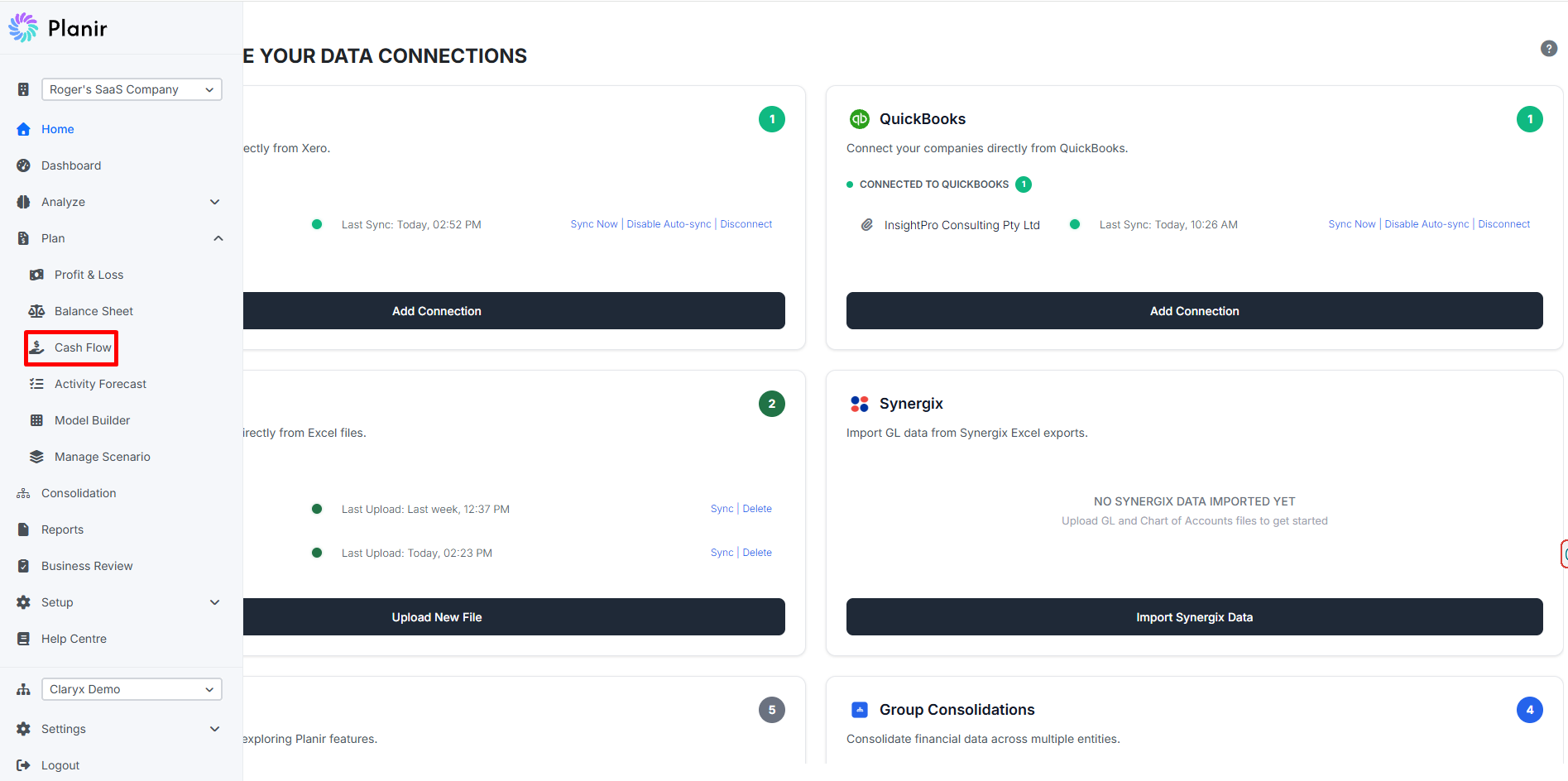
Step 1. Open the Cash Flow Page
- From the sidebar, expand Plan.
- Click Cash Flow.
The Cash Flow Statement opens with periods running across the top from your earliest historical month through your forecast horizon.
Use the controls at the top to set the period type (Month, Quarter, Year), the period end date, and the Base Scenario the forecast should reflect.
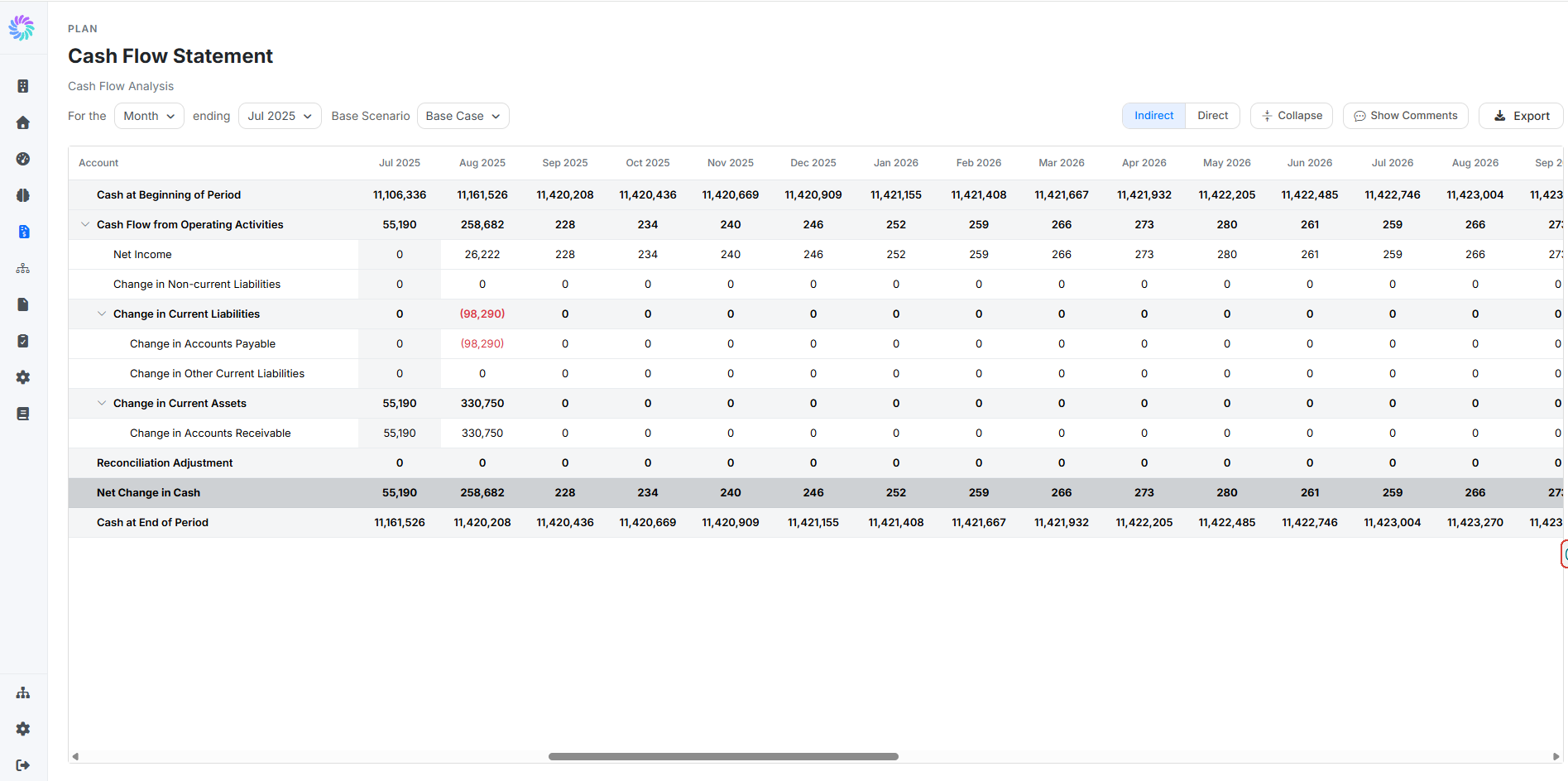
Step 2. Read the Layout
The Cash Flow Statement follows standard accounting structure. Each period column is built up like this:
- Cash at Beginning of Period: the closing cash balance from the prior period
- Cash Flow from Operating Activities: cash generated or used by day-to-day business operations. Includes Net Income from the P&L plus non-cash adjustments (such as Depreciation) and changes in working capital (such as Change in Accrued Salaries, Change in Sales Tax / GST Payable)
- Cash Flow from Investing Activities: cash used for or generated by long-term assets, such as Change in Property, Plant & Equipment
- Cash Flow from Financing Activities: cash from financing-related activity (loans, equity, dividends). Only appears when you have financing movements
- Reconciliation Adjustment: a plug line that captures any timing or rounding differences so the statement balances cleanly
- Net Change in Cash: the sum of all activity sections, showing whether cash went up or down for the period
- Cash at End of Period: Cash at Beginning of Period plus Net Change in Cash, which carries forward to the next period
Roll-up rows are shown in bold. Click the chevron next to any group (for example, Change in Current Liabilities) to expand or collapse the underlying lines.
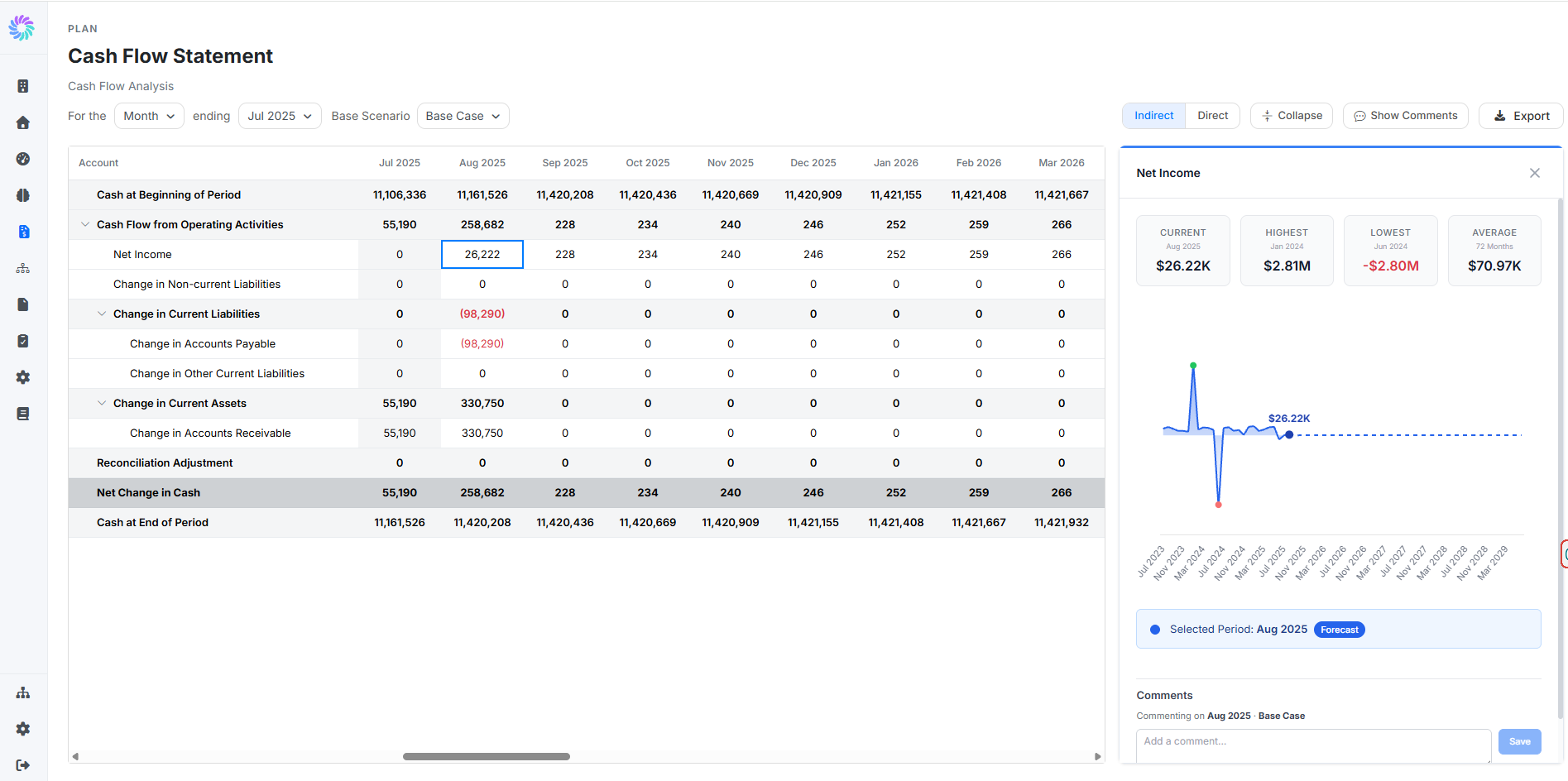
Step 3. Drill Into a Line Item
Click any cell on a Cash Flow line to open its detail panel on the right.
The panel shows:
- Current, Highest, Lowest, Average tiles for the line over the visible time horizon
- A trend chart with a clear visual split between actual and forecast periods
- A Selected Period badge indicating whether the cell is Actual or Forecast
- A Comments section for collaboration
Unlike the P&L and Balance Sheet, the Cash Flow detail panel does not include Projection Rules or Manual Journals. This is by design: the Cash Flow Statement is a derived view, so to change a forecast value here, you adjust the upstream assumption rather than overriding the cash flow line directly.
Step 4. Adjust the Forecast Upstream
If a cash flow value looks wrong, use the line you are looking at to identify which upstream area to adjust:
- Net Income line moving the wrong way? Adjust your P&L projection rules (see Forecasting Profit & Loss)
- Change in Working Capital lines moving the wrong way? Review your Cash Realization timing on revenue and expense lines in the P&L
- Change in Property, Plant & Equipment unexpected? Check or adjust the relevant manual journal on the Balance Sheet (see Forecasting Balance Sheet)
- Cash from Financing Activities missing or wrong? Record the loan, equity, or dividend movement as a manual journal on the Balance Sheet
After making the upstream change, return to the Cash Flow page and the affected periods recalculate immediately.
Step 5. Add Comments (Optional)
Use the Comments section at the bottom of the detail panel to leave notes on a specific period and scenario. Useful for documenting why you investigated a particular period, or for flagging an upstream assumption that needs review with a teammate.